A Penetration Tester’s Perspective: What’s Next after Domain Admin?

Securin
Securin Team


Jan 10, 2022
Organizations have been increasingly relying on cloud services from Azure since Microsoft provides native support. As a result, CSW pentesters have been researching various attack vectors related to Azure. Our pentesters noted that after obtaining administrative privileges on the on-premise network in an engagement, it is essential to always think of attack paths or scenarios to escalate privileges or describe the maximum impact. One such thing is escalating privileges to Azure Active Directory (AD).
On-premise administrators might access crucial information, such as Azure Active Directory (AAD) Connect, Active Directory Federation Services (ADFS), and Active Directory Azure Active Directory Single Sign-on (SSO). Users with admin rights for these services can easily get admin rights to Azure AD to manipulate and impersonate users.
In this blog, we will discuss two attack scenarios that CSW pentesters have commonly encountered during their engagements. Both the scenarios leverage misconfigurations to escalate privileges from on-premise to Azure services:
- Azure AD Connect
- Azure Active Directory Single Sign-on
Azure AD Connect
Azure AD Connect is the Microsoft tool designed to meet and accomplish hybrid identity goals. It provides the following features:
- Password hash synchronization
- Pass-through authentication
- Federation integration
- Synchronization
When AAD is configured, it creates service accounts on Azure AD and on-premises AD environments. These service accounts and their passwords are stored in the database present in the AAD Connect machine or the machine where the Active Directory sync service is running.
The service account created in Azure AD is named as follows:
Sync_<server>_<random string>@<tenant name>.onmicrosoft.com (Azure AD)
MSOL_<random string>@<domain name> (Local AD)
Usually, after dumping the Windows NT Directory Services (NTDS) file from the domain controller present in the network, our pentesters cracked the extracted hashes. Some of the passwords that were obtained could be replayed to access Azure or Office 365 Applications. Although these accounts did not have enough permissions, our pentesters could use them for the initial set of enumerations.

CSW pentesters run AzureHound, a PowerShell utility, for gathering data within Azure and Azure AD. Our pentesters were also able to identify the possible target accounts or machines that could be used during privilege escalation.
- Global administrators
- The machine where ADSync Service is running
Pentesters use the AADInternals tool, which is considered the arsenal of PowerShell cmdlets used to enumerate and attack Azure and other Office 365 applications.
- Get-AADIntGlobalAdmins—Listing global administrators of the current tenant
- Get-AADIntSyncConfiguration—Returns Azure synchronization detailsUpon accessing the on-premise machine (DirSyncClientMachine) with domain admin privileges, there is a maximum probability of obtaining cleartext credentials of the service account. We can use Get-AADIntSyncCredential from AADInternals to dump the cleartext passwords of both the service accounts.Alternatively, pentesters can also retrieve cleartext credentials from LSA Secrets.LSA SecretsLSA stands for Local Security Authority, used to manage the auditing, logging users onto the system, security policies, and storing credential materials such as service account passwords. Adversaries with SYSTEM access to a host may attempt to access LSA secrets. LSA secrets are stored in the registry here:HKEY_LOCAL_MACHINE\\SECURITY\\Policy\\Secrets.A pentester can also dump the credential materials present in the credential manager and Local Security Authority Subsystem Service to identify the cleartext password of the service account.Azure Active Directory Single Sign-onAzure Active Directory Seamless Single Sign-on (Azure AD Seamless SSO) automatically signs users in when they are on their corporate devices connected to the corporate network. When enabled, users do not need to type in their passwords to sign in to Azure AD or even type in their usernames.A machine account (AZUREADSSOACC) is created in the on-premise domain controller in each Active Directory forest that is synchronized with Azure AD.A computer account (AZUREADSSOACC) is created in the on-premise Active Directory in each AD forest that you synchronize to Azure AD (using Azure AD Connect).How did CSW pentesters discover this issue?In one of their real-world engagements, in spite of possessing the plaintext password of a global administrator, CSW pentesters were unable to access the Azure AD Portal as the multifactor authentication (MFA) was enabled for all the global administrators.Upon further deep-dive enumeration, our team of pentesters found that a user who is part of the internal IT Team but not a global administrator, had certain special permissions over Azure Resources. This user explicitly had AzResetPassword privileges over all the users while having the MFA disabled.This user also had privileges to modify the MFA settings. If our pentesters were to impersonate that user, they would be able to modify the MFA settings and attain global administrator privileges. But CSW pentesters did not have the cleartext password of the user.This is when our team found that the organization used Azure Active Directory single sign-on, with which they would be able to impersonate any user without their passwords (while keeping MFA disabled) via forging Kerberos tickets.How does this work?Suppose a pentester has the privileges of a Domain Admin or access to edit properties of the AZUREADSSOACC$ account, in that case, they can impersonate any user in Azure AD using Kerberos (if MFA is not enabled).Note: The password of the AZUREADSSOACC$ account never changes unless it is manually modified.Pwning itlsadump::dcsync /user:AZUREADSSOACC$ #using MimikatzCreating a Kerberos ticket for synced users
# Create a new Kerberos ticket
$kerberos=New-AADIntKerberosTicket -SidString “<SID>” -Hash “<NTLM>”
Note: Security identifier (SID)—SID of the user to be impersonated
NTLM—NTLM Hash of AZUREADSSOACCS$
- With the Kerberos ticket, you can now get OAuth Access Token to be used with AADInternals functions.
# Get an access token for Exchange Online
$at=Get-AADIntAccessTokenForEXO -KerberosTicket $kerberos -Domain company.com
# Send a message using “Outlook”
Send-AADIntOutlookMessage -AccessToken $at -Recipient “someone@company.com” -Subject “<Subject>” -Message “<MAIL>”

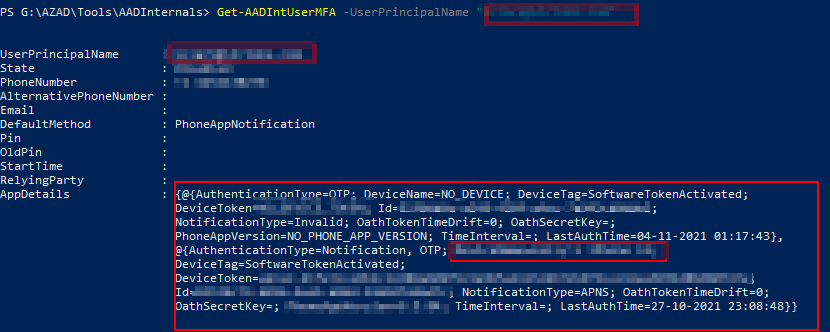
For those interested in penetration testing or red team activities, targeting Azure AD Connect and Azure Active Directory Single Sign-on will help migrate access to cloud services.
Our expert pentesters suggest that these attacks would be prevented if the following mitigation steps are in place:
- Enable multi-factor authentication for all the users present in Azure.
- It is recommended not to sync passwords of administrative accounts (Domain Admins, Schema Admins, etc.) to the cloud service.
Two other authentication methods, namely, Pass-Through Authentication and Federation Services, can also be leveraged for escalating the privileges from on-premise to Azure. The effectiveness of these authentication methods is still under scrutiny by our team of experts.
The inference drawn from the ongoing studies shall be updated to this blog in the coming weeks, so please be sure to stay abreast of the latest developments.
Share this post on: